
1. Revisit the meaning of coding (programming)
English translation
Contents
!pip install yfinance
Collecting yfinance
Downloading yfinance-0.1.70-py2.py3-none-any.whl (26 kB)
Requirement already satisfied: multitasking>=0.0.7 in /usr/local/lib/python3.7/dist-packages (from yfinance) (0.0.10)
Requirement already satisfied: numpy>=1.15 in /usr/local/lib/python3.7/dist-packages (from yfinance) (1.21.5)
Requirement already satisfied: pandas>=0.24.0 in /usr/local/lib/python3.7/dist-packages (from yfinance) (1.3.5)
Collecting lxml>=4.5.1
Downloading lxml-4.8.0-cp37-cp37m-manylinux_2_17_x86_64.manylinux2014_x86_64.manylinux_2_24_x86_64.whl (6.4 MB)
[K |████████████████████████████████| 6.4 MB 7.2 MB/s
[?25hCollecting requests>=2.26
Downloading requests-2.27.1-py2.py3-none-any.whl (63 kB)
[K |████████████████████████████████| 63 kB 1.5 MB/s
[?25hRequirement already satisfied: pytz>=2017.3 in /usr/local/lib/python3.7/dist-packages (from pandas>=0.24.0->yfinance) (2018.9)
Requirement already satisfied: python-dateutil>=2.7.3 in /usr/local/lib/python3.7/dist-packages (from pandas>=0.24.0->yfinance) (2.8.2)
Requirement already satisfied: six>=1.5 in /usr/local/lib/python3.7/dist-packages (from python-dateutil>=2.7.3->pandas>=0.24.0->yfinance) (1.15.0)
Requirement already satisfied: idna<4,>=2.5 in /usr/local/lib/python3.7/dist-packages (from requests>=2.26->yfinance) (2.10)
Requirement already satisfied: certifi>=2017.4.17 in /usr/local/lib/python3.7/dist-packages (from requests>=2.26->yfinance) (2021.10.8)
Requirement already satisfied: charset-normalizer~=2.0.0 in /usr/local/lib/python3.7/dist-packages (from requests>=2.26->yfinance) (2.0.12)
Requirement already satisfied: urllib3<1.27,>=1.21.1 in /usr/local/lib/python3.7/dist-packages (from requests>=2.26->yfinance) (1.24.3)
Installing collected packages: requests, lxml, yfinance
Attempting uninstall: requests
Found existing installation: requests 2.23.0
Uninstalling requests-2.23.0:
Successfully uninstalled requests-2.23.0
Attempting uninstall: lxml
Found existing installation: lxml 4.2.6
Uninstalling lxml-4.2.6:
Successfully uninstalled lxml-4.2.6
[31mERROR: pip's dependency resolver does not currently take into account all the packages that are installed. This behaviour is the source of the following dependency conflicts.
google-colab 1.0.0 requires requests~=2.23.0, but you have requests 2.27.1 which is incompatible.
datascience 0.10.6 requires folium==0.2.1, but you have folium 0.8.3 which is incompatible.[0m
Successfully installed lxml-4.8.0 requests-2.27.1 yfinance-0.1.70
Mounted at /content/drive
1.1 The main purpose of coding == 'Automation'
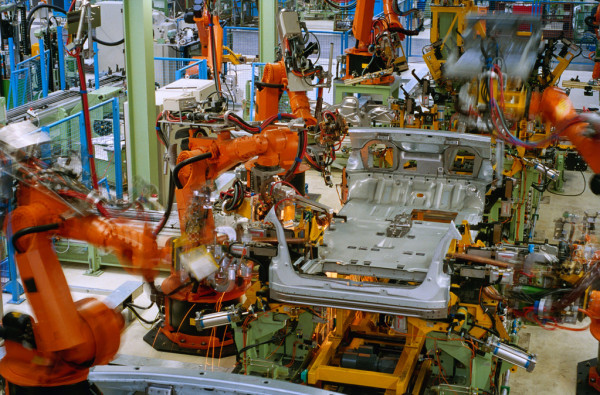
Have someone else (a machine) do the work you do not want to do
What does it mean to program well?
- Communicate so that a machine can understand you (why it is called a programming
language).
- Communicate so that a machine can understand you (why it is called a programming
What about an advanced programmer?
- They can make machines perform advanced, high-value tasks well.
To become good at English, go to the US and communicate frequently in English;
- to become good at programming, first turn on your computer and
you need plenty of programming practice.
- to become good at programming, first turn on your computer and
Background knowledge of the
taskyou assign is also essential.- People who understand the work can give effective instructions.
Ultimately, the world divides into
people who can delegate workandpeople who can only follow instructions.- You need programming skills to have others do work for you.
- Jobs that only involve following instructions are likely to be replaced by AI.
1.2 Automation example 1 - Automatically retrieve and plot KOSPI closing prices
from matplotlib import pyplot as plt
import yfinance as yf

# Daily KOSPI Adjusted Close. Internet access is required on the first run.
df = yf.download("^KS11", period="5y", auto_adjust=False,
                 multi_level_index=False, progress=False)
if df.empty:
    raise RuntimeError("KOSPI 데이터를 받지 못했습니다. 네트워크 연결을 확인한 뒤 다시 실행하세요.")
y_values = df['Adj Close']
x_values = range(len(y_values))

plt.plot(x_values, y_values)
plt.show()
[*********************100%***********************] 1 of 1 completed
<Figure size 432x288 with 1 Axes>

- This automation is possible with just a few lines of script.
1.3 Automation example 2 - Automatically retrieve news headlines
import urllib.request
import xml.etree.ElementTree as ET

feed_url = 'https://www.yna.co.kr/rss/news.xml'
with urllib.request.urlopen(feed_url, timeout=15) as response:
    feed = ET.fromstring(response.read())

headlines = [item.findtext('title', default='').strip()
             for item in feed.findall('./channel/item')[:20]]
for title in headlines:
    print(title)
- By explaining the procedure to a machine in a programming language, you can easily do this too.