
PID Control · Lesson
English translation
Execution conditions
MATLAB · Control System Toolbox
Topics covered
Selecting a gain based only on response speed can leave the system vulnerable to overshoot or model changes. Compare different performance metrics.
Overall workflow
Reference and error → P, I, D commands → input limits → response and integrator state
Current, accumulated, and changing error
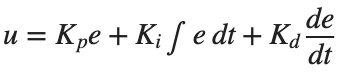
PID is expressed as . P responds to current error, I accumulates remaining error, and D responds to rapid changes. Gain effects depend on the plant and observation interval, so compare using the same input and time axis.

Practical control with input limits
Output voltage and torque have limits. If the integral keeps accumulating when u is already at its maximum, a large command may persist after the reference is lowered.
Conditional integration is one way to stop integral accumulation that would worsen the error while the input is saturated.
Why accumulate error?
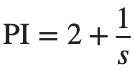
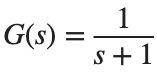
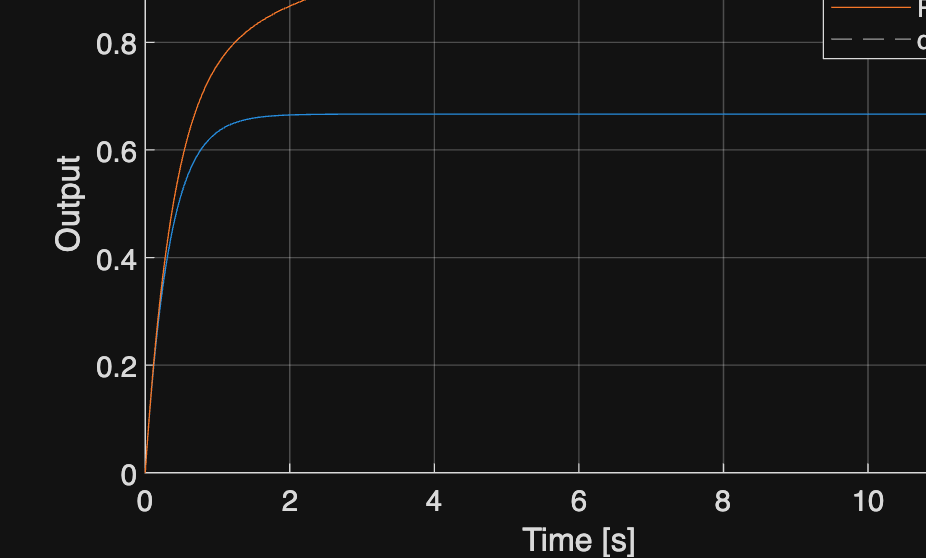
Compare and for . First examine steady-state error with a simple plant, then use a motor in the practice activity.

%% Worked example
s=tf('s'); G=1/(s+1); t=linspace(0,12,601)';
controllers={2,2+1/s}; names={'P','PI'};
figure; hold on
for i=1:numel(controllers)
T=feedback(controllers{i}*G,1); [y,tm]=step(T,t);
plot(tm,y,'DisplayName',names{i}); fprintf('%s DC Gain: %.9g\n',names{i},dcgain(T));
end
yline(1,'--'); xlabel('Time [s]'); ylabel('Output'); legend; grid on
Reference example
View more examples